Jarvis
My home operating system, built for six Raspberry Pi 5s with the kiosk Pi live first. A wall display, touchscreen and phone app run my goals, plans and work.
- Raspberry Pi 5
- Python
- FastAPI
- MCP
- Svelte
- Vite
- SQLite
- Ollama
- Tailscale
- Docker
- Playwright
The problem
Before Jarvis I built a web dashboard I called the Command Console: a focus card, to-dos, deadlines, habits and a daily check-in. I used it for a while, then looked at the data.
After the first few days, the habit and classwork trackers were blank on every day but one. I usually finished 0 to 3 of my 5 to-dos. Tracking took too much effort, and the dashboard just showed me empty boxes.
So two design rules came straight from that:
- Tracking has to be near zero effort: one tap on the wall, one tap on the phone.
- When a tracker goes unused, Jarvis should notice and ask me whether to change it, instead of showing empty boxes forever.
The solution
The first line of my design doc reads: “A tool to running my life and helping me achieve my goals in the best way possible.”
Jarvis is a home operating system: a big screen on my wall, a touchscreen to tap, and an app on my phone, all running on Raspberry Pis in my room. Every feature has to serve one loop, and anything that doesn’t goes to a parking lot:
Goals (6 to 12 months) feed this week’s focus (three items, each tied to a goal), which feeds today’s plan. I do the work and capture things as they come up, and a weekly review checks what moved and what slipped and goes back to the goals.
Day to day that means a focus card with a live countdown, what’s coming up, deadlines, a “what’s slipping” list, habits, a focus timer, and a project radar showing days since I last touched each project and its next step. During my Dell co-op weeks, it knows I’m not at school.
How it works
Hardware
- Built for six Raspberry Pi 5s (8 GB); the kiosk Pi is live first. Each one has a role in one config file: Core (the main server), Kiosk (drives the screens), Mind (the chat agent), Lab (backups and testing), Voice, and a staging Pi that gets every deploy first. The rest join stage by stage. Moving a service to another Pi is a config edit and a redeploy.
- The wall display is my Acer 24” monitor turned vertical (1080 by 1920). It’s read from across the room, so it has no touch.
- A Raspberry Pi Touch Display 2 (10.1”) for tapping things. I started it portrait, then laid it sideways, so the layout picks portrait or landscape from the screen’s shape.
- My desktop with an RTX 5070 Ti for big models. It isn’t always on, so a Pi wakes it with Wake-on-LAN when there’s a big job. If the wake fails, the job waits in a queue.
The first version was designed to cost $0 in new hardware, and every purchase waits until the stage before it works. The touchscreen (about $80) was the first thing I bought.
One Pi drives both screens: two Chromium windows in kiosk mode, one per output, with touch mapped to the touchscreen only. Getting two displays, rotation and per-screen blanking right was its own task with its own tests.
The AI router
All AI calls go through one router with made-up model names like “jarvis-fast” and “jarvis-smart”, so swapping a real model is a one-line change. It tries, in order:
| Tier | Where it runs | Used for |
|---|---|---|
| 1 | Small Ollama model on a Pi | Always on, small jobs |
| 2 | Bigger model on my desktop GPU | Big jobs, private ones included |
| 3 | Ollama cloud models (my paid Ollama Pro plan) | Non-private jobs when the desktop is off |
| 4 | Free public AI APIs | Public, non-personal jobs only |
So running Jarvis isn’t free. The Ollama Pro plan is a monthly cost, and other paid APIs like Claude are off by default behind a hard monthly cap. What stays fixed is privacy: private jobs only ever run on my own hardware.
A lot of features don’t need AI at all. Adding a to-do or flagging a stale project is plain code: instant and free. AI writes things like the morning briefing.
Privacy
- Every job has a privacy tag, and the router enforces it, not the model. Journal entries or anything about money never go to a cloud model.
- Nothing is reachable from the public internet. My phone reaches Jarvis over Tailscale, a private network only my devices are on.
- Owner-only writes. Through Tailscale, every request looks like it comes from the Pi itself, so “it’s local” no longer means “it’s me.” Any change from the phone must carry the Tailscale login header, and it has to match the owner in config.
- Read-only first. Calendar, Notion and my GitHub repos are read-only. Anything that could send, delete or spend money needs me to confirm it on my phone.
- Email is sandboxed. The model that reads email gets the text and one job (pull out dates and action items) and no tools. Instructions inside an email are never followed.
Software
- jarvis-core is Python + FastAPI, with an MCP server so AI agents use the same tools I do. It’s the only thing allowed to write to my notes.
- The HUD is one Svelte + Vite app with three layouts: wall, touch and phone. No blur or heavy 3D, because it has to stay smooth on a Pi.
- SQLite holds fast-changing data. My Markdown notes vault holds anything I’d read myself, and every write to it is a git commit, so any change can be undone.
- Server-Sent Events stream from the core, so when I send something from my phone at home, the wall reacts. At school it doesn’t bother, since nobody’s there to see it.
- Everything runs in Docker on the Pis, deployed over Tailscale.
The phone app
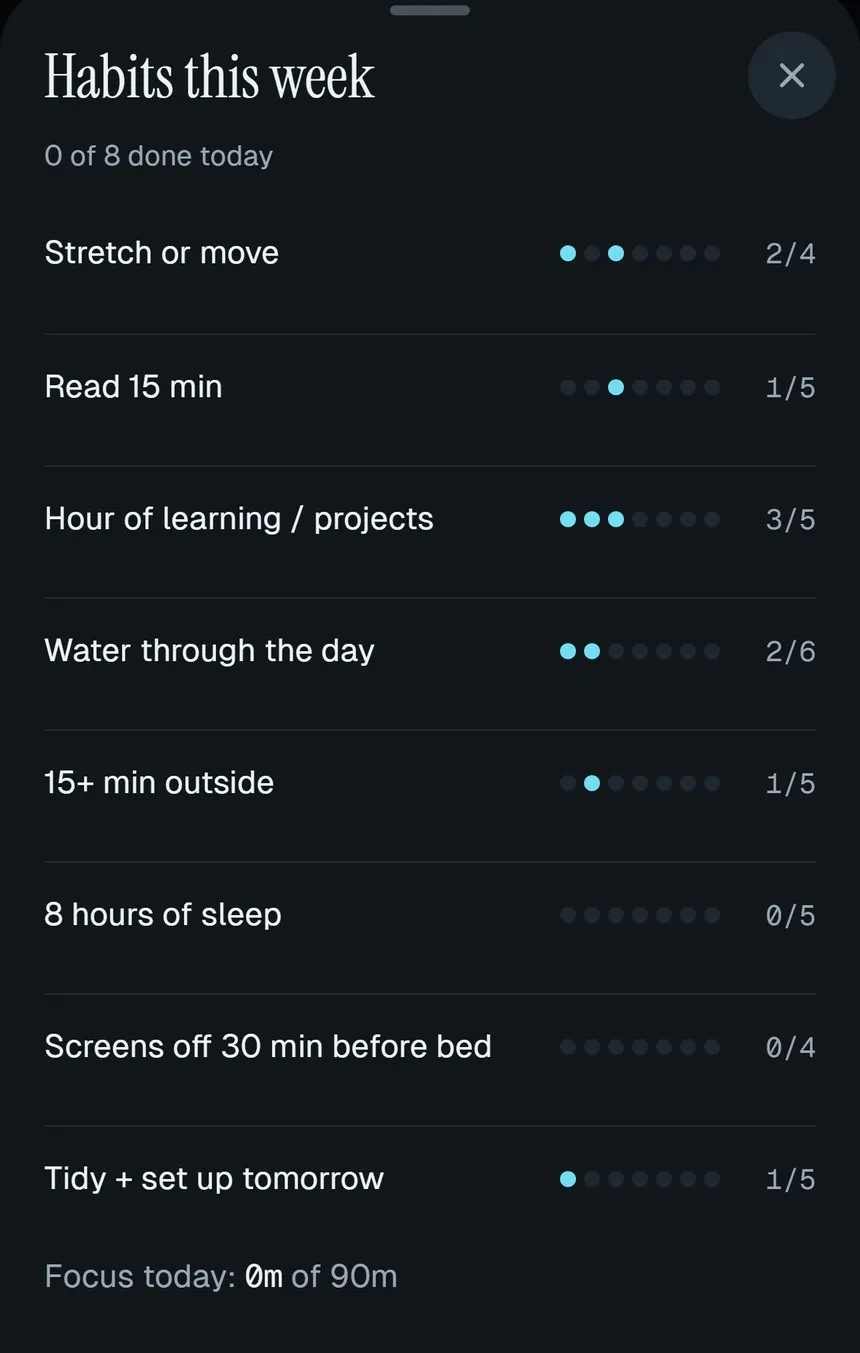
I wanted the phone app to look like a real product. It has five tabs: Today, Tasks, Projects, Chat and Pis. Common actions are at most two taps away and sit in the thumb zone. It installs to the home screen and opens offline, but the data is always live.
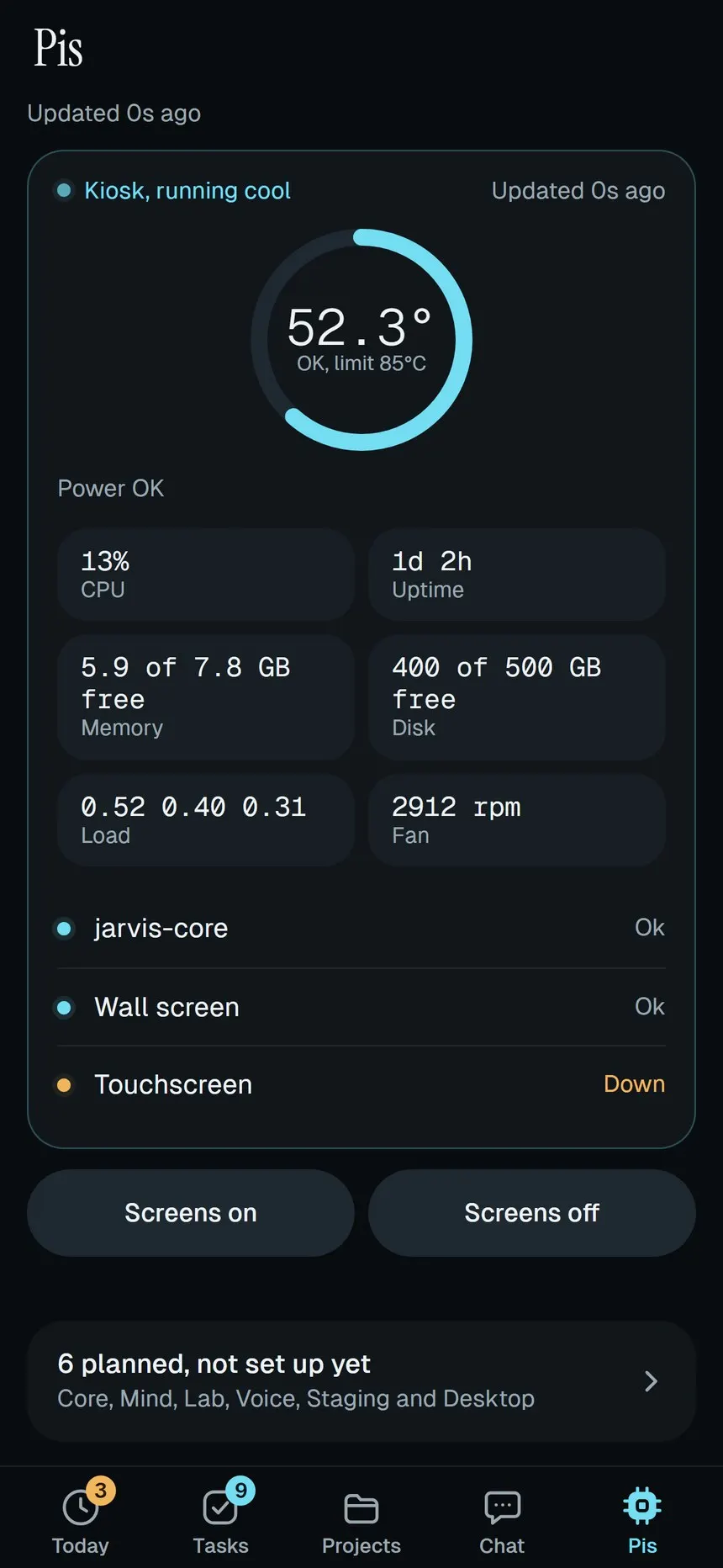
On the Pis tab, temperature is colored (OK below 60 °C, warm up to 75, hot above), and any throttle or under-voltage flag shows red. Machines that aren’t set up yet show as a dim card saying which stage they join in. Every probe has a timeout, so a slow reading shows “n/a” with a reason instead of breaking the page.
Testing
My standing rule is proof for every feature. Each one ships with:
- a passing test run, with tests written before the code,
- a screenshot of it working on the real screen (wall, touch and phone),
- and for background jobs, the log line.
A real-browser fit check with Playwright fails the build if any panel clips text or scrolls at the real screen sizes. Nothing counts as done until I’ve seen it work on the device.
That rule caught a real failure. I designed “tap the dark touchscreen to wake it up,” and it passed with a simulated tap. With a real finger, the touch controller kept sending taps for a little while after the screen turned off, then after about 60 seconds sent nothing at all. Tap-to-wake couldn’t work.
So I replaced it. “Screens off” now turns the wall display fully off but keeps the touchscreen on with its backlight at zero under a black overlay. A tap anywhere wakes it, and that first tap is swallowed so you don’t press something underneath.
Using it for real found more:
- An on-screen keyboard, because the kiosk has no keyboard and I couldn’t type a to-do during my own demo.
- Bigger text on the touchscreen and wall, after the landscape layout turned out too small to read.
- A 25 or 50 minute focus timer that shows on all three screens.
- Night dimming from 9 pm that warms the colors and drops the touchscreen backlight to 40%.
Results
- The kiosk Pi runs the wall display and touchscreen together, proven on the device with a physical finger-tap drill.
- Three layouts from one app, all checked by the fit test at their real sizes.
- Nothing exposed to the public internet, and phone writes are owner-only.
- In daily use since October 2026.
What I learned
- A passing test isn’t proof. The simulated tap passed. The real finger didn’t.
- Design from your own data. The blank tracker days in the Command Console shaped Jarvis more than any feature list.
- Put the privacy rule in code. A router that refuses to send private jobs out is safer than trusting each prompt.
- Build in stages that each end in something visible, so the project never stalls halfway.
What’s next
The big piece still ahead is the full goal loop: a short interview that writes my goals, and a weekly review that reads my week and proposes next week’s focus. After that comes voice (a “Jarvis” wake word on its own Pi) and a wall mount I’ll 3D print myself.
Demo video
Demo video coming soon: A day with Jarvis on the wall, the touchscreen and my phone